
.png)
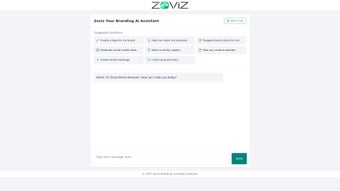
Description
Download Zoviz Branding Expert – AI‑Powered Branding Tool for Businesses
Overview: Why Zoviz Branding Expert Stands Out in the Crowded AI Tool Market
In today’s hyper‑connected marketplace, a strong visual identity and consistent messaging can be the difference between a brand that thrives and one that fades into the background. Zoviz Branding Expert is an all‑in‑one AI branding assistant that brings professional‑grade design, naming, and strategy capabilities to businesses of every size. Whether you’re a startup hunting for that perfect logo and name, or an established company looking to refresh your visual language, Zoviz offers a suite of intelligent features that cut down on the time, cost, and guesswork traditionally associated with brand development.
The platform leverages state‑of‑the‑art natural language processing and generative design algorithms to understand a brand’s personality, target audience, and industry trends. By feeding it a few key inputs—such as brand values, preferred tone, and market niche—users receive a curated set of logo concepts, naming options, color palettes, and even a brand story that resonates emotionally with customers. Beyond visual assets, Zoviz extends its AI muscle to content creation, offering social‑media post ideas, catchy captions, calendar planning, and hashtag generation that keep a brand’s online presence fresh and discoverable.
What truly separates Zoviz from generic design generators is its strategic depth. The tool doesn’t just throw out random graphics; it provides data‑backed recommendations on color psychology, typography hierarchy, and messaging consistency. The built‑in brand audit feature evaluates existing assets and suggests improvements, ensuring that every touchpoint—from the website header to Instagram stories—speaks the same language. In short, Zoviz Branding Expert is positioned as a comprehensive branding partner, delivering the kind of expertise that would normally require a full‑time creative team.
For businesses concerned about security and data privacy, Zoviz adheres to industry‑standard encryption and stores user inputs on secure cloud servers, ensuring that proprietary brand ideas remain confidential. Regular updates roll out new design templates, AI model improvements, and feature enhancements, keeping the software future‑proof. If you’re looking to download a free trial that promises a secure, AI‑driven branding experience, Zoviz Branding Expert deserves a close look.
Key Features That Power Your Brand Strategy
- AI‑Generated Logo Concepts: Upload a brief description of your brand personality and receive up to 20 unique logo designs, each customizable for color, layout, and typography.
- Smart Business Naming: Generate a list of memorable, SEO‑friendly business names with domain availability checks built directly into the platform.
- Color Palette & Psychology Engine: Choose from curated palettes backed by research on emotional impact and audience perception, with suggestions for primary, secondary, and accent colors.
- Brand Story Builder: Draft a compelling brand narrative using AI prompts that guide you through mission, vision, and values articulation.
- Social Media Content Suite: Receive daily post ideas, catchy captions, and a 30‑day content calendar tailored to your brand voice and industry trends.
- Hashtag Generator: Create brand‑specific hashtags that boost discoverability on platforms like Instagram, TikTok, and Twitter.
- Brand Audit & Recommendations: Upload existing assets for an AI‑driven audit that highlights inconsistencies and offers actionable improvements.
- Multi‑Platform Export: Export logos, color codes, brand guidelines, and social assets in formats compatible with Adobe Illustrator, Canva, and direct upload to major social networks.
- Collaboration Hub: Share drafts with team members, collect feedback, and iterate in real time without leaving the application.
- Secure Cloud Storage: All brand assets are saved in encrypted cloud storage, accessible anytime from Windows, macOS, Android, or iOS devices.
Each of these features is designed with a specific pain point in mind. For instance, the AI logo generator eliminates the need to hire a freelance designer for initial concepts, while the naming tool prevents the common frustration of discovering that a preferred domain is already taken. The color palette engine references extensive research on how hues influence purchasing decisions, giving you a scientifically grounded edge.
Beyond the core capabilities, Zoviz continuously learns from user interactions. The more you engage with the platform—by selecting preferred designs, tweaking copy, or providing feedback—the more refined the AI’s suggestions become. This adaptive learning loop ensures that the tool evolves alongside your brand, delivering increasingly relevant recommendations over time.
Overall, the feature set is both deep and broad, making Zoviz suitable for a range of branding projects, from one‑off logo creation to full‑scale brand revamps. The integrated workflow reduces the need to juggle multiple apps, saving both time and money.
Installation, Usage, and Compatibility Across Devices
Step‑by‑Step Installation Guide
Downloading and installing Zoviz Branding Expert is straightforward, whether you prefer a web‑based experience or a native desktop app. Follow these steps to get started:
- Visit the official Zoviz website and click the “Download Free Trial” button. The site automatically detects your operating system and offers the appropriate installer (Windows . exe, macOS . dmg, or direct web access).
- For Windows users, run the .exe file and follow the on‑screen prompts. macOS users should drag the Zoviz icon into the Applications folder after opening the .dmg file.
- After installation, launch the application and create a Zoviz account using your email or a social‑login option (Google or Apple ID). An email verification step ensures account security.
- Once logged in, you’ll be greeted by a short onboarding wizard that asks for your business sector, brand personality adjectives, and target audience demographics. This data powers the AI’s initial suggestions.
- Accept the end‑user license agreement, and you’re ready to explore the dashboard.
Cross‑Platform Compatibility (itemprop="operatingSystem")
Zoviz Branding Expert supports the following operating systems:
- Windows 10, 11 (64‑bit)
- macOS 12 Monterey and newer
- Android 8.0+ (via dedicated mobile app)
- iOS 13+ (iPhone & iPad)
- Web browsers – Chrome, Firefox, Edge, Safari (no plug‑ins required)
The cloud‑based nature of the tool means that any changes you make on one device sync instantly to all others. This real‑time synchronization is especially useful for teams that collaborate from different locations or for designers who switch between a desktop workstation and a tablet while sketching concepts.
Usage Tips for Maximum Efficiency
To extract the most value from Zoviz, consider the following workflow:
- Start with the Brand Personality Quiz: The AI uses these inputs to tailor logo styles, color palettes, and copy tones.
- Iterate Quickly: Use the “Regenerate” button on any design to receive fresh variations without starting from scratch.
- Leverage the Collaboration Hub: Invite teammates, assign tasks, and collect comments directly on drafts.
- Export Early: Save intermediate assets (e.g., color codes, typography choices) so you can apply them across other design tools.
- Schedule Content: Utilize the built‑in calendar to line up social posts weeks in advance, freeing up time for strategic planning.
Overall, the installation process is designed to be frictionless, and the intuitive interface ensures that users of all skill levels can begin creating brand assets within minutes.
Pros, Cons, and Frequently Asked Questions
Pros & Cons (itemprop="review")
Pros:
- AI generates high‑quality logo concepts in seconds, reducing reliance on external designers.
- Comprehensive branding suite (naming, colors, story, social content) in one platform.
- Cross‑platform compatibility ensures seamless workflow on Windows, macOS, Android, and iOS.
- Secure cloud storage with end‑to‑end encryption protects proprietary brand ideas.
- Regular updates add new templates, AI improvements, and feature expansions.
Cons:
- Advanced customization (e.g., intricate vector editing) may still require a dedicated design tool.
- Free trial limits the number of exported assets per month.
- Learning curve for users unfamiliar with AI‑driven branding concepts.
- Internet connection required for cloud sync and AI processing.
- Pricing tiers may be steep for very small startups on a tight budget.
FAQ – Your Branding Questions Answered
Is Zoviz Branding Expert free to use?
Zoviz offers a free trial that allows users to generate up to 10 logo concepts and access basic naming suggestions. For unlimited exports and advanced features, a paid subscription is required.
Can I export my logo in vector format?
Yes. Once you finalize a logo, Zoviz lets you download it as an SVG file, which is fully scalable and compatible with professional design software.
How secure is my brand data on Zoviz?
All user data is encrypted in transit (TLS) and at rest. Zoviz complies with GDPR and CCPA standards, ensuring that your brand concepts remain private.
Does Zoviz integrate with other design tools?
Exports are available in PNG, JPEG, SVG, and PDF formats, allowing seamless import into Adobe Illustrator, Canva, Sketch, and other popular design applications.
What operating systems are supported?
Zoviz runs on Windows 10/11, macOS 12+, Android 8.0+, iOS 13+, and any modern web browser (Chrome, Firefox, Edge, Safari).
Can I use Zoviz for multiple brands?
Yes. The platform allows you to create separate projects for each brand, keeping assets, naming ideas, and content calendars distinct and organized.
Beyond the quick answers, it’s worth noting that Zoviz’s support team provides detailed tutorials, live chat assistance, and a growing knowledge base. Users who take advantage of these resources often report faster onboarding and higher satisfaction scores. The combination of a robust feature set, transparent pricing, and proactive customer care makes the tool a compelling choice for anyone serious about building a cohesive brand identity.
Conclusion: Is Zoviz Branding Expert the Right Investment for Your Business?
When it comes to building a memorable brand, the combination of creativity, strategy, and consistency is non‑negotiable. Zoviz Branding Expert delivers a powerful AI‑driven solution that bridges the gap between professional design agencies and DIY tools. Its comprehensive feature set—spanning logo generation, naming, color psychology, brand storytelling, and social media content—means you can centralize all branding tasks in a single, secure environment.
For entrepreneurs and small‑to‑medium enterprises, the ability to generate high‑quality assets without a hefty agency fee can accelerate time‑to‑market and free up budget for growth initiatives. Mid‑size companies benefit from the collaboration hub and brand audit, which streamline internal approvals and ensure every department works from the same visual language. Larger organizations appreciate the scalability of cloud storage, the depth of analytics, and the capacity to manage multiple brand portfolios from one dashboard.
Security considerations also play a pivotal role. Zoviz’s compliance with major data‑protection regulations, coupled with end‑to‑end encryption, gives decision‑makers confidence that sensitive brand information stays protected. The regular cadence of feature releases and AI model enhancements further guarantees that the platform will evolve alongside market trends, protecting your investment over the long term.
While the pricing may feel premium for ultra‑small startups, the return on investment often manifests quickly through reduced design cycles, faster domain acquisition, and more engaging social content—all of which translate into measurable revenue growth. If your organization values speed, data‑backed creativity, and a collaborative workflow, Zoviz Branding Expert is more than a tool; it’s a strategic partner that can scale with your ambitions.
Ready to experience the transformation yourself? Download the free trial today, explore the AI‑generated concepts, and see firsthand how a secure, cloud‑based branding suite can elevate your business’s visual and verbal narrative.
Start your free trial now and join the growing community of brands that trust Zoviz to shape their identity, streamline their content calendar, and secure a competitive edge in the digital marketplace.
Guides & Tutorials for Zoviz Branding Expert
How to install Zoviz Branding Expert
- Click the Preview / Download button above.
- Once redirected, accept the terms and click Install.
- Wait for the Zoviz Branding Expert download to finish on your device.
How to use Zoviz Branding Expert
This software is primarily used for its core features described above. Open the app after installation to explore its capabilities.
User Reviews for Zoviz Branding Expert 0
No reviews found




